Showing posts with label blogger tip. Show all posts

2011/12/09

How to create and change blog icon (favicon) in Blogger

Do you agree that it is boring to keep you blog icon unchanging for such a long time? Is your blog unique comparing to millions of other blogs. Recently, I have changed my blog icon. Is it different from other blogs. Yes, it is. Today I will show you how to make your blog different from others by creating and changing your blog icon (favicon). You can do this by following these simple steps:


1. Create your blog icon

There are many ways to create an icon for your blog both online and offline. For convenience, I use an online banner creator service called bannersnack to create my blog icon. The banner size should be 20x20. However, it is very hard for you to work on such a small size. I recommend you to create an icon size of 200x200. After publishing your icon, you should take a snap of your icon, trim unnecessary parts, then resize it to 20x20.


2. Upload your icon. 

You can upload your icon to any image hosting services such as imageshack, photobucket. However, I recommend you to host it right on blogger like this icon.. Just follow this simple steps:


  • Create "a new post"

  • Select "insert image" to upload the icon

  • Finally, copy the image url


3. Add code to your blog html template


  • Dashboard>Design>Edit HTML

  • Search for this tag

  • Put this code right above the tag


    <link href="%3Cb%3Eurl%20of%20your%20icon%3C/b%3E" rel="shortcut icon">


  • Remember to replace the phrase url of your icon

  • Done!


Note:  You can change your blog Favicon by click on edit, then upload your blog icon, like this:
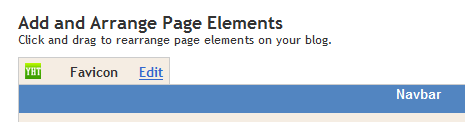

Favicon is only used to distinguish your blogs. It does not change your blog icon.


Thanks for visiting our blog. Please leave your comment and share with us

How To Show Related Posts in Blogger with Published Date

Do you want to increase your blog pageviews from your unique visitors by showing them the related posts ( related articles) in the same category or label? Today I will show you the way to show related posts in your blogger that really on my blogger. I have tried several ways to show the related posts on my blog, however, it did not work as I expected. Out of them, this method is really WORK on my blog, so I decide to share it to you. Let's start.

How to host a website online

Web Hosting is the Internet service that allocates space for individuals, companies, and organizations to put up their own website and make it available to the readers via the Internet.. Web hosting companies provide their clients with space on a server. A website owner rents space to make their presence known on the Internet. Web hosting companies also offer web hosting packages. Depending on the type of packages, prices for web hosting services range from free to a couple of hundred dollars a year. So, do you want to learn how to host a website? It's a very simple process. If you are not unsure what you will do, just find a tutorial website, they will teach all stuffs that you need to host your own website.

Free SEO backlink tools

If you are a blog/website owner, then you need to know how important SEO is for your blog/website. There are many ways to SEO for your blog/website by either free method or paid method. There is a fast and free way that I really want to introduce to you is to use free SEO backlink tools. By using a SEO tool you can build a thousand of backlinks for your website without much effort and time.